This post explains how a robot that talked with kids worked, and the decisions behind it: the body, the parts, the wiring, the software and the cloud. The robot ran on a quad-core phone chip from about 2014.
What it had to do #
- Hear one child in a noisy room. Siblings talk, the TV is on, and the robot’s own motors whine.
- Know who is talking. Answer the child it is playing with, and ignore the parent on the phone behind it.
- Answer fast. A young child expects a reply in about a second.
- Look alive all the time. Blink, look at faces, breathe and react to a touch, also while it is silent.
- Stay dark at night. A robot in a bedroom keeps the room dark when it installs an update at 05:00.
Body #
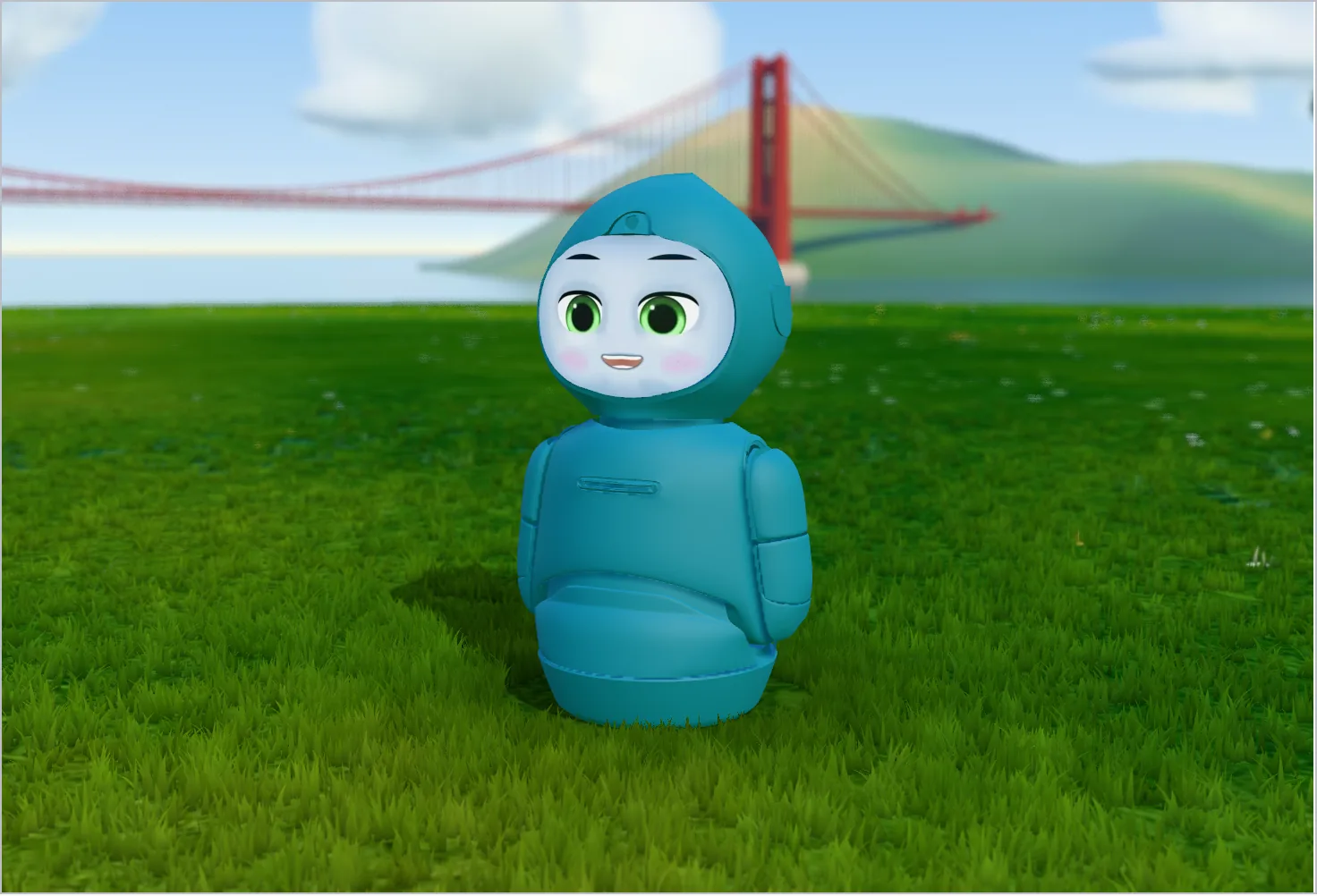
A child talks to a face, so the robot needed a face first. It also needed a way to show where it was looking, and arms to gesture with.
Legs would let a robot follow a child, but they add motors, balance, battery, noise and falls. So the robot sat on a table and had seven motors:
| # | Motor | Movement |
|---|---|---|
| 0 | Left arm up/down | Swings forward and up, about 200° |
| 1 | Left arm in/out | Shoulder out, then elbow in |
| 2 | Right arm up/down | Swings forward and up, about 200° |
| 3 | Right arm in/out | Shoulder out, then elbow in |
| 4 | Head nod | ±15° |
| 5 | Body turn | Turntable in the base |
| 6 | Body lean | ±15° |
The head only nodded. To look left or right, the robot turned its whole body, and the eyes on the face did the fine aiming. This kept a turning motor out of the head, where the microphones were.
Parts #
| Job | Part | Why |
|---|---|---|
| Face | A small DLP projector at the top of the head shines toward the back of the head. A mirror there reflects the image forward onto the back of a curved visor. | Projected light follows the curve of the head. Software draws the face, so it can show any expression. |
| Eyes | One HD camera above the face | Finds faces, reads head pose and estimates distance from face size. |
| Ears | A mic array with its own DSP | Echo cancellation, beamforming, noise suppression and the direction a voice comes from |
| Muscles | Seven motors on a microcontroller board | Real-time motor control, separate from the main chip |
| Touch and balance | Two touch pads on the chest, one on the front and one on the back, and an IMU, all on the same microcontroller board | Knows when a child touches the robot or picks it up |
| Lights | An RGB LED bar on the chest | Shows state, such as listening or sleeping |
| Brain | A Rockchip quad-core ARM chip under 2 GHz, a mobile GPU, a few GB of RAM, Wi-Fi, Android | A phone chip has a GPU for the face and for the face detector, and Android has drivers for most parts |
| Heat | One fan for the projector and one for the main chip | The robot is a closed shell |
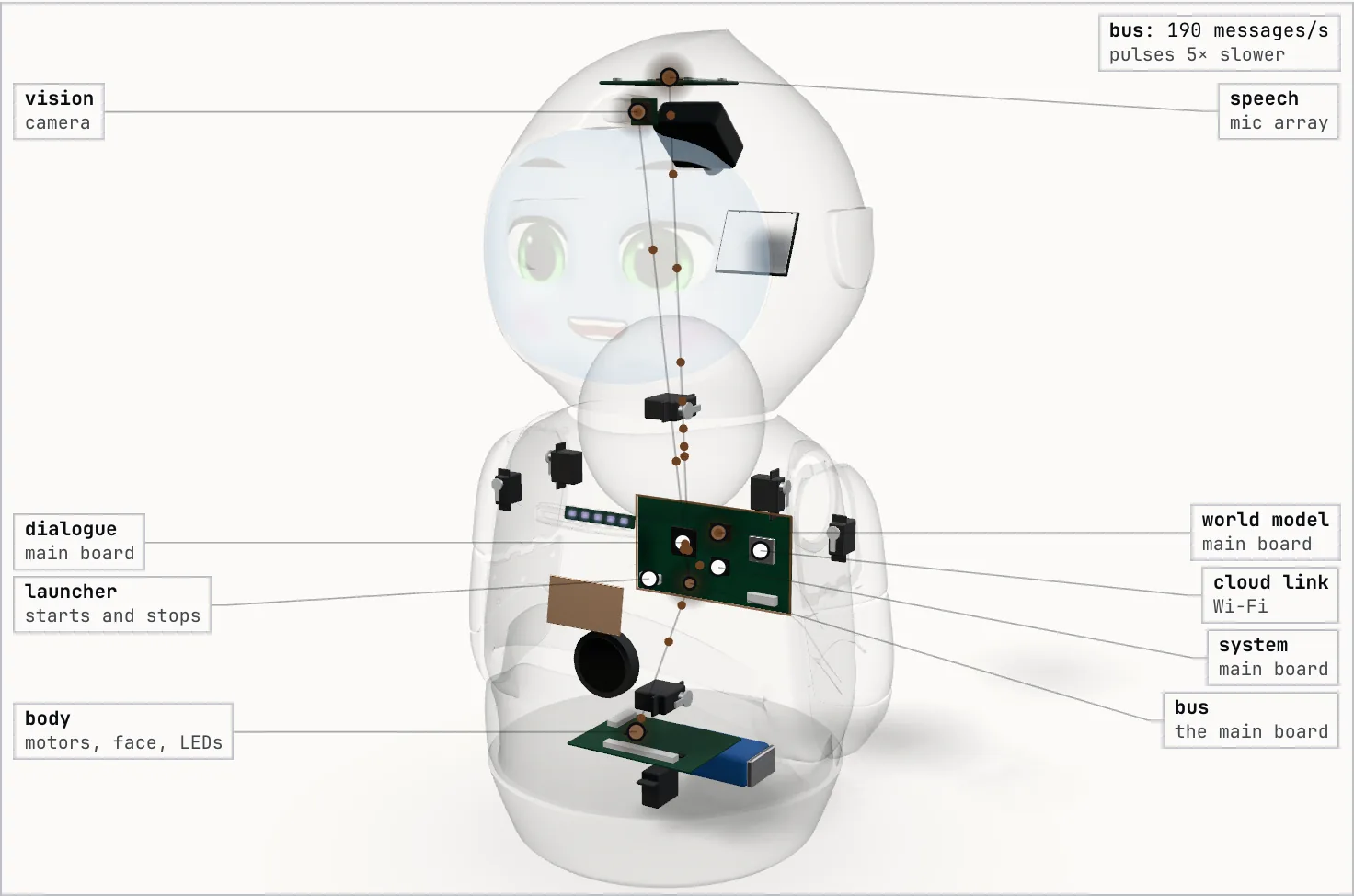
Pick a part to see it inside the shell and the wire that connects it to the main board.
Wiring #
Android can pause a program for 100 ms to clean up memory or wait for the disk. In an audio loop that pause is a click. In a motor loop it is a jerk. So the robot followed one rule: each real-time job got its own processor, and the main chip did only work that could wait a moment.
- The mic array cleaned the audio itself. It removed the robot’s own voice, focused on the speaker and cut noise. The main chip got one clean channel.
- The motor board ran the motors, the touch pads and the tilt sensor. It stayed awake while the main chip slept, and woke it on a touch, a pick-up or the charger.
The figure plays one second of traffic on each link, ten times slower. Tap a link to see what it sends.

Where the code ran #
The robot had a phone chip and a Wi-Fi link to the cloud. There were three ways to split the work between them:
| Design | What it does well | What hurts |
|---|---|---|
| Thin client: stream everything to the cloud | Large models for speech and conversation | Every blink and head turn would wait on the network. Weak Wi-Fi would stop the robot. |
| Everything on the robot | No network latency | Large speech and language models were too big for a small robot chip. |
| Split: perception, body and scripted talk on the robot; speech-to-text and open conversation in the cloud | The robot stayed alive offline, and the cloud added the large models | Two brains had to agree on one answer, and the robot had to hide the cloud’s latency |
The robot used the split design. The rest of this post is about how the two halves worked together.
Software #
The robot did many jobs at once: listen, look, think, talk and move. The face and the motors had to keep running even when another job failed. So each job ran as its own Android process, called a service:
| Service | Job |
|---|---|
| bus | A local publish/subscribe proxy that every other service connected to |
| speech | Audio from the mic array, voice activity, wake phrases, speech-to-text streaming |
| vision | Camera, face detection, tracking and recognition, QR codes |
| world model | Who is where, who is talking, and who is engaged |
| dialogue | A local rule-based dialogue engine plus cloud conversation |
| cloud link | The only connection to the cloud: MQTT, uploads and updates |
| system | Battery, CPU, memory and disk metrics |
| body | A game engine: face, animation, motors, LEDs and text-to-speech |
All services shipped in one Android app, so one update changed them together. The app was the home screen, because Android starts the home screen at boot and starts it again if it dies.
Message bus #
The services had to share data, but separate processes do not share memory. So they talked through one relay on the robot, a ZeroMQ proxy1. A service sent a message on a topic, and every service that listened to that topic got a copy.
Each topic was the name of the message’s type, such as vision.Faces. Both
sides already had that type in their code, so there was no separate list of
topic names to keep in sync.
| Topic | Sent by | Listened to by |
|---|---|---|
audio.VoiceDirection |
speech, 100/s | world model |
audio.Transcript |
speech | world model |
vision.Faces |
vision, up to 30/s | world model |
body.CameraPose |
body (game engine), 30/s | vision, world model, speech |
world.People |
world model, 30/s | dialogue, body, speech |
dialogue.SayLine |
dialogue | body |
cloud.ChatAnswer |
cloud link | dialogue |
system.PowerState |
launcher | system, cloud link |
A sender did not know who listened, and a listener did not know who sent. So a service could crash or restart while the others kept running, and one side could change without the other noticing. For example, a transcript looked the same whether a local recognizer or the cloud made it.
The relay also sent a message back to its sender if the sender listened to the same topic. So each message carried the sender’s process id, and the sender dropped its own copy. The figure follows one message from the vision service.

Power states #
The robot did not need every service all the time. At night it needed only enough to hear its wake phrase. During an update it needed the cloud link but no face. An extra service cost battery and heat, and a missing one broke a feature.
So each power state was a list of the services that had to run in it. There were 12, such as running, light sleep, suspend and silent reboot. A launcher kept the running services equal to the list. On a change, it stopped the services that the new list left out, in reverse start order, and started the new ones. If a service crashed, a monitor restarted it.
All the processes ran on the main board. In the figure, each one is at the part it drives, and each pulse is one message, 5 times slower than real. Press “Next state” to see which processes stop in each power state. Pick a process to see what it sends and listens to.
One sentence, step by step #
A child says “I saw a tiger at the zoo today.” Press Play to follow it. Each box keeps its place, and each step shows the message that moves.

The next sections follow the same path in more detail.
Hearing #
The speech service cut the clean audio into 120 ms chunks for speech-to-text. Every 10 ms the mic array also reported the direction of the voice.
The robot had to know when a child started and stopped speaking. One voice detector alone also fired on the TV and on the motors. So the robot combined a small speech model2, a classic voice detector and the voice direction. Speech from where the robot was looking counted more.
Young children pause in the middle of a sentence. So parents could set how long the robot waited before it decided the child had finished.
Speech to text #
Good speech-to-text needed models too large for the robot, and the best vendor changed over time. So the robot sent the audio to the cloud, and the cloud chose the vendor.
The speech service put the audio on the local bus as messages: start of speech, 120 ms chunks, end of speech. The cloud link forwarded them, and the transcripts came back the same way. When the vendor changed, the robot code stayed the same.
Wake phrases were the exception. Keeping bedroom audio on the robot saved money and protected privacy. So a small recognizer on the robot listened for “hello” and the robot’s name. When it was unsure, it asked the cloud to confirm.
Seeing #
The chip could run only one detector at a time: faces by default, or QR codes, book covers and picture cards when an activity needed them. Three small face models, under 10 MB together, found faces, read head pose and smiles, and recognised the child.
The robot had one camera and no depth sensor. So it estimated distance from the width of a face, with sizes for children’s faces. A face 8% of the frame wide was about 1 m away.
Who is talking #
A transcript holds the words, not who said them. With several children in the room, the robot had to know who spoke, to answer and look at the right one. The world model matched the voice to a face:
- Hear. During speech, it took the voice direction every 45 ms. It added the body’s turn angle, so directions stayed fixed to the room while the robot turned.
- See. The camera found faces in a view about 80° wide. Each face became a person with a direction and a distance.
- Match. Each person had a cone of about 32° on each side. Each direction sample voted for the cone it fell in, and the person with the most votes got the words. Samples near the centre of a cone, and near the end of the speech, counted more.
Press Play to watch three children and the robot on a lawn. The large view shows the scene. The small view is the robot’s camera.
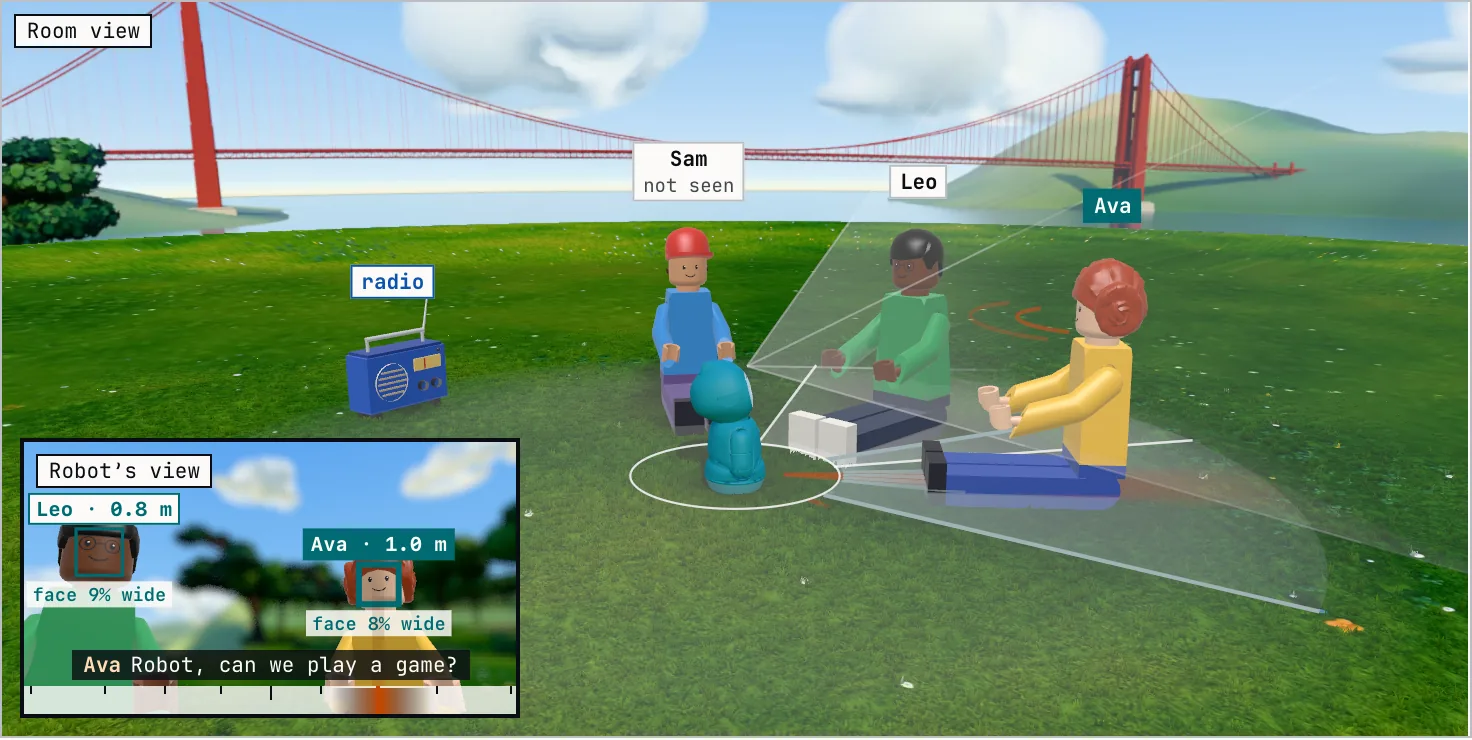
A child could speak from outside the camera’s view. So a voice with no face became a voice-only person, 1 m away in that direction, and the robot turned toward it. If a face appeared there, the face joined that person. If not, the voice-only person faded out within a few seconds.
The robot also had to choose who to talk to and where to look. So each person had an engagement score with two parts. Gaze rose while the child faced the robot. Response rose when the child’s answers fit the conversation. A score of 0.5 or more meant engaged. The table in Fig. 6 shows both parts.
Local and cloud answers #
The robot had two dialogue engines. A local rule engine (ChatScript3) ran scripted activities and commands. The cloud ran open conversation with intent models, question answering and an LLM.
The words alone did not say which engine had the better answer. “Speak up” is a local command, and “why is the sky blue” needs the cloud. So both engines ran on every turn. The cloud was slower, so its request went out first:
- The cloud request went out with the words, the current activity and a turn id.
- The local engine ran. A command such as “speak up” answered in milliseconds.
- In a scripted activity, the robot waited up to 800 ms for the cloud. It waited 1,000 ms more if the local engine had only “I didn’t get that”.
- It ranked the answers: commands, then script answers, then other answers, then fallbacks. On a tie, the local answer won.
If the cloud marked the input as unsafe, the robot said: “I’m sorry. You should talk to a trusted adult.”
In open conversation the cloud took seconds, and a quick reaction showed the child that the robot had heard. So the robot reacted at once with a “curious” animation, which also gave the child time to add more words. If the answer was still missing, a “thinking” animation followed. The answer played once the child had been quiet for 1 s. After 9.5 s without an answer, the robot said a fallback line.
A parent setting chose how long these fillers lasted, from none up to about 2 s each.
Saving dialogue state #
The local engine kept each child’s progress, such as their place in a story, in a file. It ran on every turn, also when its answer was not used. The story had to move forward only on turns the child heard.
So each turn wrote to a buffer first. If the robot used the turn’s answer, the buffer went to disk. If not, the buffer was dropped. The file also had a checksum and four backups, so the robot could recover a damaged file.
The cloud did not see the turns that the local engine answered. So after every turn, the robot told the cloud what it said, and the cloud’s transcript stayed complete.
Speaking #
Movement had to match the words: a wave on “hello”, a smile on the happy part. So the answer was text with commands at the word where each one starts, in SSML:
<speak>
  <mark name="anim:curious"/>Tigers are the biggest cats!
  <mark name="mood:happy"/>What did the tiger do?
</speak>
The game engine sent the whole line to a text-to-speech engine on the robot. It got back the audio and the time of each speech sound and each command. It mapped the speech sounds to 41 mouth shapes and played everything against the audio clock. Syncing speech, face and body shows how.
System actions used the same marks. “Go to sleep” at the end of a sentence let the robot finish talking before it lay down.
Recap #
- Each job was its own service. The services talked through a local message bus, with the message type as the topic.
- The mic array cleaned the audio, and the cloud turned it into text.
- The world model gave the words to the face whose direction matched the voice.
- Local rules and the cloud answered every turn, and the robot ranked the answers. In open conversation it reacted at once and spoke the cloud answer when it came.
The last part of a turn was the body.
Motors #
Motion for a character is design work. Animators needed to shape and preview each move in their own tools, and the face, body and lights had to stay in step. So the motors followed a 3D model of the robot. Animators made the motion in Maya on the same model as Fig. 1. The game engine played it, and 30 times a second it sent the model’s joint angles to the motors.
Writers needed a simple way to say “wave here”. So a mark in a line of dialogue named a behaviour, at the word where it starts, like the marks in Speaking. A behaviour played one or more animation clips, often with a sound. It could pick a random variant, or play an intro, a loop and an exit.
Play a motion, or drag a motor’s row to move it by hand. As on the robot, the sound’s clock drives the motion. The Baby Shark song plays from the official video, which loads when you press Play.
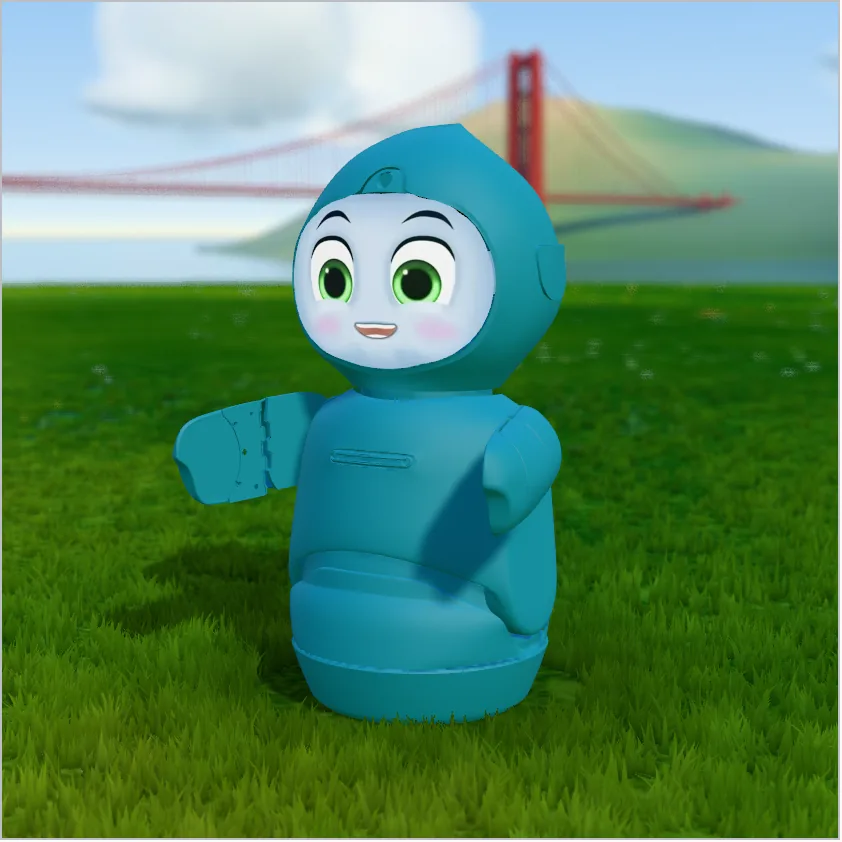
Android could delay a frame (see Wiring). So each frame of seven positions carried a timestamp, and the motor board smoothed the motion between frames. The game engine sent frames only while the motor board reported that it was active, so the motors moved only when the board was ready.
Motor feedback #
The motor board reported touch, pick-up, tilt, battery level, stalls, errors and motor positions.
The camera sat on the moving body, so when the robot turned, every face moved in the image. From the motor positions, the game engine published where the camera pointed. Vision and the world model removed the robot’s own motion, so people stayed in place.
The motors were loud, and the microphones were close. So the game engine warned the speech service before a fast arm move. The speech service also dropped one-word, low-confidence transcripts, which were often motor noise.
Face and LEDs #
The face was a 3D model with a custom shader for the pupils, shine and sparkles. The visor was curved, so the engine pre-warped the image to look right on it, and flipped it for the mirror.
The LED bar worked like the motors. Animators keyed its colours on the same timeline as the face and the body, and the engine sent them to the LEDs every frame.
Syncing speech, face and body #
A child watches the face, the arms and the words together, so they had to match and stop together. So one line of dialogue held the commands for the face, arms, gaze and lights, and one clock timed them all: the speech audio.
Marks #
A line could hold four kinds of marks:
- Mood. One of 11 moods, such as happy, sad or curious, at intensity 0 to 2. One mood value set both the mouth shapes and the eye shapes.
- Gesture event. A short name such as “question” or “you”. While the robot spoke, a talking animation played an arm and body movement for each event.
- Behaviour. A named behaviour, such as a laugh or a dance.
- Sound, props and pauses. A sound effect, glasses on the face, or a pause.
A tool added the first gesture marks from the words: toward the robot on “I” and “me”, toward the child on “you”, a question gesture on “what” and “how”. Writers then edited the marks in an editor that played the line on a virtual robot.
Timing #
Play one sample line, or drag the playhead. Then press “Next case” for the two cases below: a blocking laugh, and a child who interrupts.

The game engine started the audio. Every frame, it fired each mark and speech sound whose time had passed. The mouth played on its own animation layer, so it moved over whatever face a behaviour showed.
Each behaviour ran on a named track. A new behaviour on a track replaced the old one. Gaze came last: after the animation set the pose, the eyes, head and body turned toward the child. So the arms could wave while the eyes stayed on the child.
A mark at the start of a line could be blocking: the audio waited until that animation ended. A laugh at the start of a line worked this way: the robot laughed first, then spoke. Only an animation with a fixed end could block, because a loop runs forever.
Stopping and resetting #
- Lines reset. Each line ended with a neutral mood and no gesture.
- Interruptions stopped everything. If the child talked over the robot, the game engine stopped the speech, the queued lines, and every animation and sound they started.
- After speech. An idle animation took over: listening, engaged, looking for a face, or nobody in view.
Marks from the cloud #
Short tokens are easier for an LLM to write than raw marks. So its prompt listed
a few hundred short tokens, such as {wave} or {happy}, each with a
description. The cloud kept only the tokens from its list and turned them into
marks. A mood token also changed the speech rate, pitch and volume until the end
of the sentence.
An action token took time. So the cloud added a pause after it, and the next words started when the animation ended.
Cloud connection #
Home Wi-Fi drops and blocks ports. If each service talked to the cloud on its own, each would need its own login and reconnect logic. So one service, the cloud link, held the only connection: MQTT over TLS on port 443, which most home networks allow. The connection stayed open, so the cloud could also send to the robot.
- Identity. A password in the app would be the same on every robot. So each robot made its own key pair on first boot and registered the public key. To connect, it signed a token that was valid for 24 hours.
- Bridge. The cloud chose which bus messages it wanted from a robot, and it could send messages onto the robot’s bus. To the services, the cloud was one more sender.
Settings #
Parents changed settings in a phone app: volume, reply speed, time zone and the family profile. The robot might be off at that moment, and the robot and the cloud had to use the same values.
The cloud stored each robot’s settings on top of system-wide defaults. It sent them to the robot on every change and on every connect, so a robot that was off caught up. The cloud link put them on the local bus, where each service read what it needed. The robot also sent its settings with each chat request, so the cloud answered with the values the robot used.
Updates #
A robot in a home had to update itself safely. Updates used Android A/B4: the update goes to a second copy of the system, and the robot can boot the old copy if the new one fails. The cloud could also roll a robot back to an older version. The robot rebooted between 05:00 and 07:00.
A reboot in a bedroom had to stay dark. But the bootloader and the kernel start before the app, and they turn on the backlight and the LEDs. So the app rebooted with the reason “quiet”, which a hardware register kept through the reboot. The bootloader and the kernel read it and kept the backlight and LEDs off, and the app started with the face off. This needed changes in the app, Android, the kernel and the bootloader.
Fallbacks #
A robot in a family home had to recover on its own. So every layer had a plan for when the layer below it failed. Recovery started with the smallest unit and moved up: a thread, a process, the whole robot, then the OS image. The figure plays one failure at a time and shows where recovery stops.
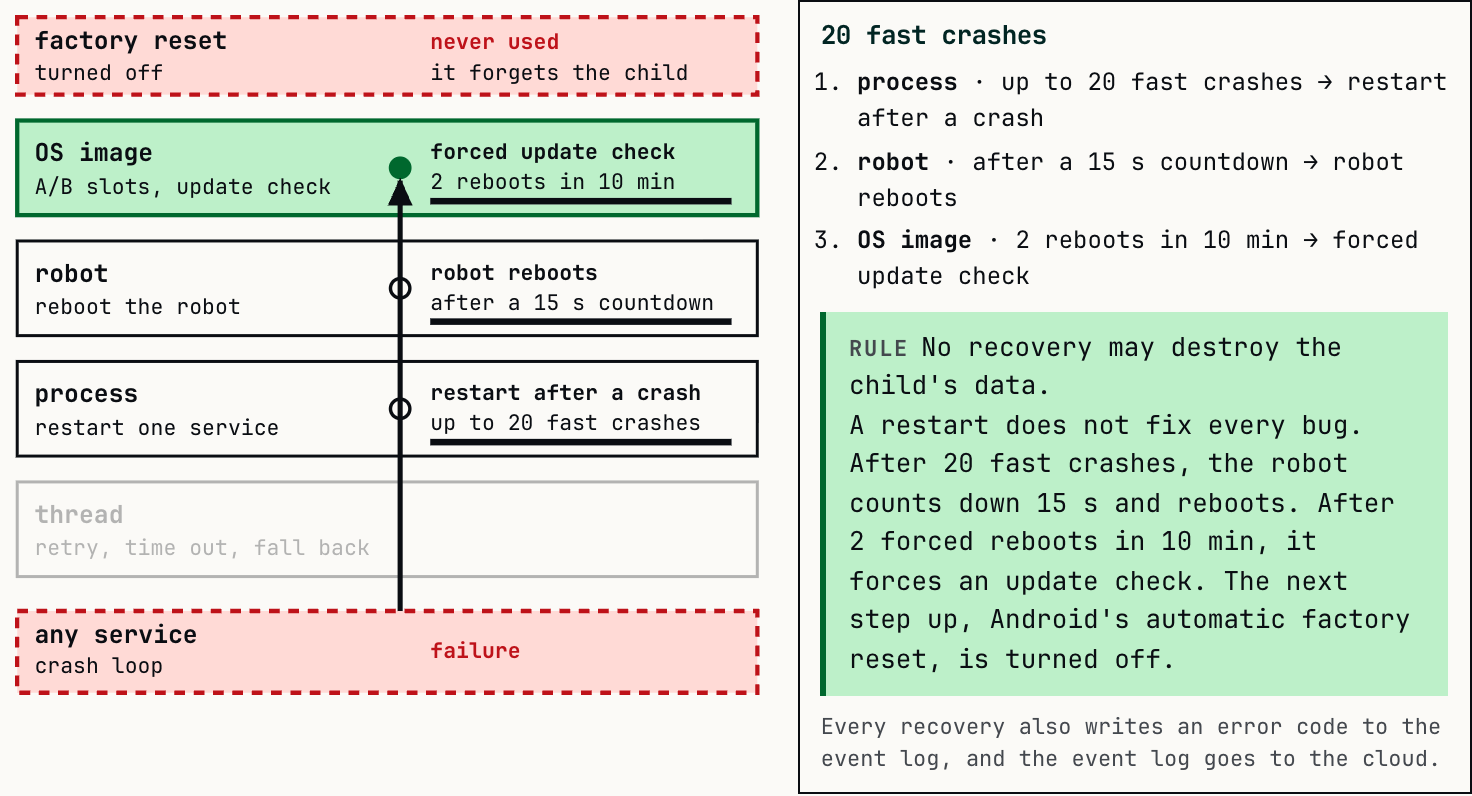
- Every wait has a timeout, and every timeout has a next step. The dialogue waited 9.5 s for the cloud, then spoke a local line.
- Fail fast. When a chat request could not be sent, the cloud link answered “offline” at once, so the dialogue moved on.
- Keep the child’s data. Android can factory-reset a phone after repeated crashes. The robot turned that off to keep what it had learned about the child.
Restarts also hide bugs: a service that crashes every few minutes still looks healthy. So each recovery wrote an error code to a log that went to the cloud.
Local and cloud brains #
| Local brain, on the robot | Cloud brain | |
|---|---|---|
| Runs | Scripted activities, commands, rules | Open conversation, intent models, an LLM, the daily schedule |
| Knows | Where the child is in each script, the faces it has learned | The full transcript, long-term memory of the child, the family profile |
| Speed | Milliseconds | Seconds |
| Offline | Works | Unreachable |
The local brain kept the robot alive without Wi-Fi. It saw faces, looked at people, reacted to touch and heard its wake phrase. Full speech-to-text came from the cloud, so offline the robot understood far less.
Two brains with their own state can disagree. This is the split-brain problem from distributed systems, and it could happen on every turn. The figure shows one turn as two event logs, one for each brain. Press “Next case” to see each way it can go:
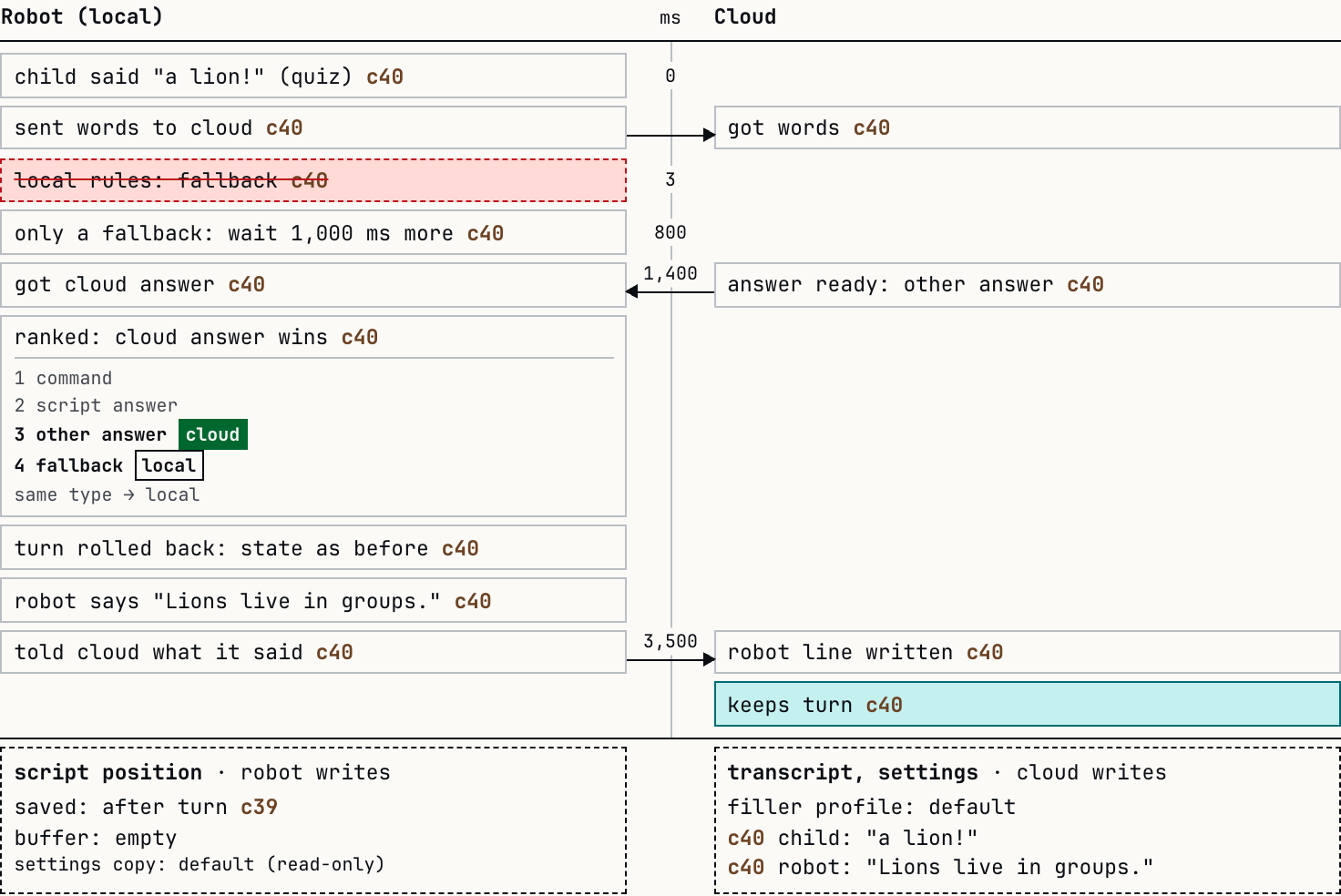
Each way the brains could disagree had one rule:
| Conflict | Rule |
|---|---|
| Both brains answer the same turn | A fixed ranking by answer type. If both answers had the same type, the local one was used. |
| The local brain ran a turn that was discarded | The turn was a transaction. Its state change was rolled back. |
| The cloud prepared an answer that was discarded | The next request told the cloud to drop that turn from its history. |
| The local brain answered alone | After every turn the robot told the cloud what it said. |
| An answer arrives late | Each answer had its turn id. An answer for any other turn was ignored. |
| The child is talking when the answer arrives | The answer waited until the child was quiet. |
| Settings | The cloud stored them and pushed them. The robot sent them back in every request. |
Each piece of state had one writer. The local brain wrote the script position. The cloud wrote the transcript and the settings. The other side kept a read-only copy.
This made features more work to build. Each feature needed a path in both brains, and each state change needed a rule for when the other brain disagreed.
Credits #
The robot is Moxie, made by Embodied, Inc. Its 3D model, face art and animations are © Embodied, Inc. They are used here for education only. The Baby Shark song is © The Pinkfong Company and plays from its official YouTube video.
The children in Fig. 6 use parts from the LDraw.org Parts Library, CC BY 4.0.
-
ZeroMQ, “zmq_proxy”: http://api.zeromq.org/4-3:zmq-proxy ↩︎
-
Shor et al., “TRILLsson: Distilled Universal Paralinguistic Speech Representations”, 2022: https://arxiv.org/abs/2203.00236 ↩︎
-
ChatScript: https://github.com/ChatScript/ChatScript ↩︎
-
Android A/B (seamless) system updates: https://source.android.com/docs/core/ota/ab ↩︎