About 40–60% of user interactions begin on the listing page: a grid of cars
with filters for city, price, make, and features. Each filter change used to
run a SQL query with several joins, a second query for the count, and a
serializer on top. This post shows how we moved that read path to Valkey. Each
filter becomes a sorted set of car ids, a page is the intersection of those
sets, one HMGET fetches the cards, and a personalised order is computed in
the web server from one unordered set. The list API got 4x faster, and a wrk
benchmark served 6x more requests.
We built this in 2021. Part 1 covers the business, the user flow, and how we made the individual car page fast.
What the listing page needs #
The listing page needs three things:
- Filters: city, make, model, price range, colour, features, and so on.
- Pagination: a page of cars at a time, with the total count.
- Order: by price or date, or by a recommendation model that uses the buyer’s browsing history.
The existing way: Django filters on SQL #
The schema, cut down to what the filters touch: a car has a price, a
colour, a locality (which belongs to a city), and a variant. A variant (for
example XM) belongs to a model (Nexon), and a model to a make (Tata). Features
such as AMT are many-to-many, through a car_features table.
The backend uses Django and Django REST Framework, with django-filter for the filters:
from django_filters import rest_framework as filters

class NumberInFilter(filters.BaseInFilter, filters.NumberFilter):
    """Accepts a comma-separated list, e.g. make=10,12"""

class CarFilterSet(filters.FilterSet):
    """Custom filter class for filtering cars"""
    city_id = NumberInFilter(field_name="locality__city__id", lookup_expr="in")
    price_min = filters.NumberFilter(field_name="price", lookup_expr="gte")
    price_max = filters.NumberFilter(field_name="price", lookup_expr="lte")
    make = NumberInFilter(field_name="varient__model__make__id", lookup_expr="in")
    model = NumberInFilter(field_name="varient__model__id", lookup_expr="in")
    color = NumberInFilter(field_name="color__id", lookup_expr="in")
    features = NumberInFilter(field_name="features__id", lookup_expr="in")
    slug = SlugFilter()  # our own filter, described below

    class Meta:
        model = Car
        fields = [
            "make",
            "model",
            "year",
            "color",
            "price",
            "slug"
        ]
from rest_framework import viewsets, mixins
from rest_framework.filters import OrderingFilter
from django_filters.rest_framework import DjangoFilterBackend
from .filters import CarFilterSet

class CarViewSet(viewsets.GenericViewSet, mixins.ListModelMixin):
    queryset = Car.objects.all() # django lazy queryset
    serializer_class = CarSerializer # converts django orm objects into json
    filter_backends = (DjangoFilterBackend, OrderingFilter) # django filters
    filterset_class = CarFilterSet # custom filterset
    ordering_fields = ["price", "year"]
    pagination_class = CarPagination
For each request, the ViewSet filters the queryset, cuts one page out of it, and serializes that page to JSON.
One request #
GET https://api.car.com/listing/?city_id=1&price_min=200000&price_max=400000&make=120,121&ordering=price&page=2

SELECT car.id, car.price, car.varient_id, car.color_id, car.locality_id
  FROM car
 INNER JOIN locality ON (car.locality_id = locality.id)
 INNER JOIN varient ON (car.varient_id = varient.id)
 INNER JOIN model ON (varient.model_id = model.id)
 WHERE (locality.city_id IN (1) AND car.price >= 200000 AND car.price <= 400000
        AND model.make_id IN (120, 121))
 ORDER BY car.price ASC
 LIMIT 10   -- page_size
OFFSET 10   -- (page - 1) * page_size; max_page = ceil(count / page_size)
This is the SQL Django generates for the filter set above. It joins only the
tables a filter needs: city_id is already a column on locality, and
make_id a column on model, so city and make are never joined.
The response contains one page of cars and the total count:
HTTP 200 OK
{
  "count": 1023,
  "next": "https://api.car.com/listing/?page=3",
  "previous": "https://api.car.com/listing/?page=1",
  "results": [
    {
      "id": 1,
      "images": [
        "https://cdn.car.com/1/front.webp",
        "https://cdn.car.com/1/left.webp",
        "https://cdn.car.com/1/right.webp",
        "https://cdn.car.com/1/back.webp"
      ],
      "price": 721000,
      "model_name": "Nexon",
      "varient_name": "XM",
      "link": "/user-cars/1",
      "city_name": "Mumbai",
      "owner": "1st"
    }
    . . . = page_size cars
  ]
}
Slugs for search pages #
For SEO, a listing page can also have a readable URL. A Google search for “used Nexon cars in Mumbai” opens a page with that phrase in its path:
🌐 https://car.com/used-nexon-cars-in-mumbai
-- client takes path and sends as slug query param to the backend
GET https://api.car.com/listing/?slug=used-nexon-cars-in-mumbai
The SlugFilter splits the slug into tokens and looks each one up in a table
to get the query string. Every slug maps to a valid combination of the
filters above.
used-nexon-cars-in-mumbai => model=121&city_id=1
| id | value | type | filter |
|---|---|---|---|
| 1 | nexon | model | 121 |
| 2 | mumbai | city | 1 |
| 3 | 4-lakh | price | 400000 |
| 4 | tata | make | 2 |
| 5 | petrol | fuel_type | 1 |
Problems with this approach #
Every request does the same work again. The filter query joins up to four
tables. Pagination runs a second query, COUNT(*) with the same joins. The
serializer then reads model_name, varient_name and city_name, which
needs more joins with select_related, or one query per car without it.
Many buyers ask for the same popular filter combinations, such as all cars in
Mumbai, and the database answers each one from scratch.
Two simpler fixes do not work well here:
- Cache each response by URL. Page number, ordering, and the order of the query parameters all make new keys for the same result. One sold car makes every cached page that contains it wrong, and there is no fast way to find those pages.
- Precompute every page, as Part 1 did for car pages. A car page has one key per car. A listing page has one per combination of filters, and the number of combinations can be far larger than the number of cars.
The set of cars that match one filter value stays small.
Filters are sets #
Each filter value picks a set of car ids: the cars in Mumbai, the cars priced
₹4–8 L, the cars with AMT. A page is the cars that are in every set the buyer
asked for, which is an intersection. A filter with several values, such as
make=10,12, is a union. In Figure 1, switch the filters on and off:
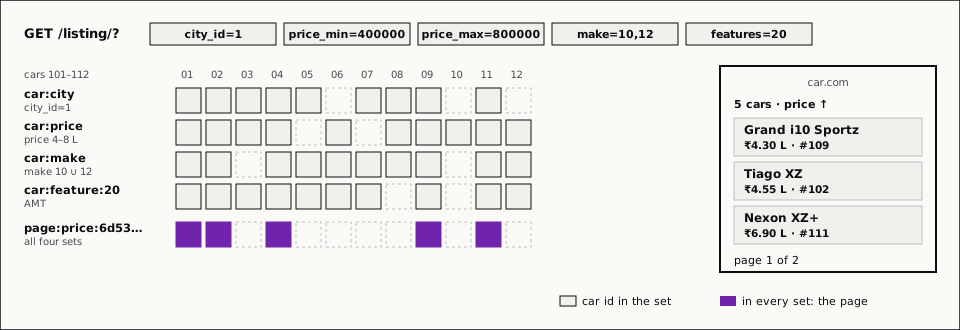
Valkey1 keeps these sets in memory as sorted sets, one per filter attribute, with the attribute as the score. A range filter is then a range read:
ZRANGEBYSCORE car:price 100000 500000   # cars priced 1–5 L
ZRANGEBYSCORE car:color 5 5             # cars with color_id = 5
These reads are O(log(N) + M), where N is the size of the set and M the
number of cars returned. Sorting a list or set with SORT2 instead costs
O(N + M * log(M)). Set operations3 (ZINTERSTORE, ZUNIONSTORE) combine
the results.
Features are many-to-many, so one car:feature sorted set cannot hold them.
We keep one set per feature, car:feature:{id}, with the car ids as members
and a score of 1.
The keys #
car: holds the listing JSON
#
To serve the cards, we keep one hash, car:, with the car id as the field and
the listing JSON as the value. HMGET car: 101 102 103 returns every card on
a page in one call. The maximum page size is 35, so that is at most 35 values.
(MGET over one string key per car would also be one call.)
A hash uses the compact listpack encoding only while it has at most 512
fields (hash-max-listpack-entries) and every value is at most 64 bytes
(hash-max-listpack-value)4. Our car: hash holds every live car, and
each value is longer than 64 bytes, so Valkey stores it as a regular hash
table. In a test on Valkey 9.1 with 10,000 sample cars, the hash used about 5%
less memory than one string key per car. The large savings in
Instagram’s post
come from many small hashes with short values; the setting it names,
hash-zipmap-max-entries, is now called hash-max-listpack-entries.
car:<attribute> holds the indexes
#
These are the sorted sets from above: car:price scores by price, car:city
by city id, car:make by make id. Each set holds every live car, so it has
thousands of members.
Keeping them fresh #
We listen to the database change log. When a detail in the listing JSON
changes, we update that car’s field in car:. When a car reaches a terminal
state, such as sold or removed, we delete its field from car: and its id
from every index set.
Serving one page #
Filtering a sorted set gives the cars in score order, so a price-ordered result can be stored once and paged many times:
-
Key. Hash the filters into a key such as
page:price:{queryhash}. The hash must not depend on parameter order, and it leaves outpageandordering:F('city_id=1&color=3,4') eq F('color=4,3&city_id=1'). -
Hit. If the key exists, read one page with
ZRANGE key start stop(ZREVRANGEfor descending order), the total withZCARD, and the cards withHMGET car: …. -
Miss. Build the result from the indexes, store it with a TTL, and continue as for a hit:
-
ZUNIONSTOREfor a filter with several values, such asmake=10,12:ZUNIONSTORE all_cars 3 cars_set_1 cars_set_2 cars_set_3 AGGREGATE MAX -
ZINTERSTOREto combine the filters:ZINTERSTORE filtered_cars 2 cars_set_1 cars_set_2 WEIGHTS 1 0By default,
ZINTERSTOREadds up a car’s scores from every input set. Give weight 1 only to the set whose score is the sort key, such ascar:price, so the result keeps the price as its score.
-
The order depends only on car data, so a stored result is the same for every buyer who sends that query, and later pages skip the filters entirely.
We do some set operations in the web server instead, then fetch the cards
with HMGET:
def filter_by_price(redis_pipe, price_min='-inf', price_max='+inf'):
    return redis_pipe.zrangebyscore(
        name="car:price",
        min=price_min,
        max=price_max
    )
A miss sends several commands, 12 in the example below. We send them in one
pipeline5, so the client does not wait for each reply. This saves network
round trips and server work: Valkey reads many commands with one read()
system call and writes many replies with one write(). The Valkey docs report
up to 10 times more queries per second with long pipelines.
The figure follows one request over 12 sample cars: a miss, a hit for page 2, and what a sale does to a stored result.
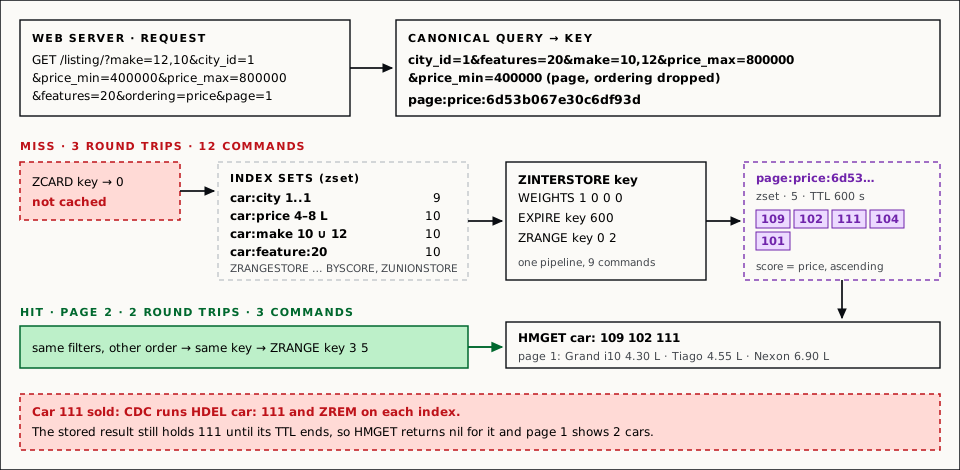
sha1 of the canonical query, first 18 hex digits. Use ← and → to step.Personalised order #
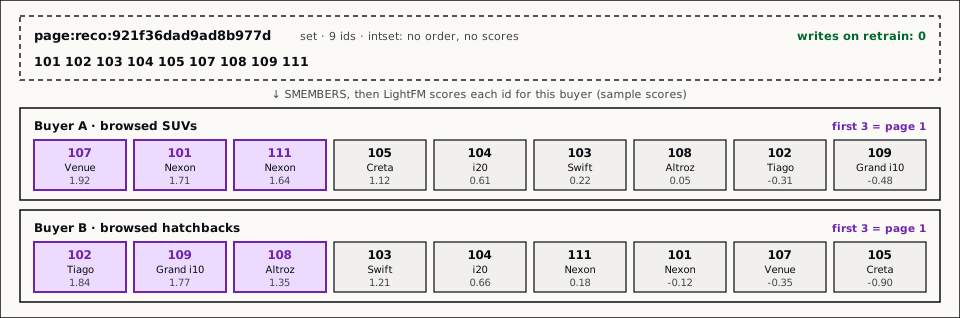
When the order comes from the recommendation model, it depends on the buyer,
and it changes every 45 minutes when we retrain the model. So we do not store
the order. The key hashes only the car-related filters, and the value is the
unordered set of matching car ids, written with SADD. This helps most on
popular base pages, such as all cars in Mumbai.
On each request, the web server reads the set, ranks the ids with the LightFM
model it keeps in memory, slices out the requested page in Python, and fetches
those cards with HMGET.
A stored order would have to exist once per buyer, or buyer group, and be rewritten after every retrain. The set is one key per query, and a retrain writes nothing to Valkey. The web server uses more CPU instead.
Limits #
- Stale ids until the TTL ends. A stored result is not an index, so the
change-log consumer does not update it. A sold car stays in it,
HMGETreturns nil for that id, and the view must skip it. Until the key expires, the page is short and the count is too high (step 8 of Figure 2). - Empty results are never cached.
ZINTERSTOREdoes not store an empty set, so a filter that matches no car misses on every request. - Everything is in memory. The
car:hash, one sorted set per filter attribute, one set per feature, and every stored result. - Personalised pages cost CPU. The web server scores every id in the set on every request, so a broad query with many cars costs more than a narrow one.
Result #
Production numbers from NewRelic, before and after the change.


A wrk benchmark of the list API:

What we showed #
- Django filters on SQL repeat the same joins and the same count for every buyer who asks for the same filters.
- A filter value is a set of car ids in a Valkey sorted set, scored by the attribute. A page is the intersection of those sets.
- A price-ordered result is stored once with a TTL and paged many times. One
HMGETon thecar:hash fills the page. - A personalised order is computed per request from one unordered set, so a model retrain writes nothing to Valkey.
-
↩︎
Valkey COMMAND Ref
Command Description SETSets the string value of a key, ignoring its type. The key is created if it doesn’t exist. TTLReturns the expiration time in seconds of a key. HMSETSets the values of multiple fields. HMGETReturns the values of the given fields in a hash. HGETALLReturns all fields and values in a hash. SADDAdds one or more members to a set. Creates the key if it doesn’t exist. SCARDReturns the number of members in a set. SINTERReturns the intersection of multiple sets. SINTERSTOREStores the intersection of multiple sets in a key. SISMEMBERDetermines whether a member belongs to a set. SUNIONReturns the union of multiple sets. SUNIONSTOREStores the union of multiple sets in a key. ZADDAdds one or more members to a sorted set, or updates their scores. Creates the key if it doesn’t exist. ZCARDReturns the number of members in a sorted set. ZCOUNTReturns the count of members in a sorted set that have scores within a range. ZDIFFSTOREStores the difference of multiple sorted sets in a key. ZINTERSTOREStores the intersection of multiple sorted sets in a key. ZMSCOREReturns the score of one or more members in a sorted set. ZRANGEReturns members in a sorted set within a range of indexes. ZRANGEBYSCOREReturns members in a sorted set within a range of scores. ZRANGESTOREStores a range of members from a sorted set in a key. ZRANKReturns the index of a member in a sorted set ordered by ascending scores. ZREMRemoves one or more members from a sorted set. Deletes the sorted set if all members were removed. ZSCANIterates over members and scores of a sorted set. ZSCOREReturns the score of a member in a sorted set. ZUNIONReturns the union of multiple sorted sets. ZUNIONSTOREStores the union of multiple sorted sets in a key.