Buyers reached our pre-owned car platform from ads, and the car page they opened had to respond in 60 ms. This post shows how we served that page from one pre-computed JSON in Valkey, how a reader on the MySQL binlog kept that JSON fresh when three different apps changed prices and photos, and what happens to a price change when each part of that pipeline fails. The listing page is covered in Part 2. This guide assumes some familiarity with backend technology.
What is Valkey?
Valkey is an open-source, high-performance key/value datastore under the BSD license. It works as a cache, a message queue or a primary database. It runs as a standalone daemon or as a cluster with replication and high availability.
Valkey is a fork of Redis, made after Redis changed its license terms. arstechnica.com covers the fork.
The platform #
Buyers on our pre-owned car platform read detailed reports, book test drives and decide to buy. The platform combines a marketplace and an inventory model.
Marketplace #
Buyers and sellers talk directly. We earn by charging buyers for the seller’s contact details.
Inventory #
We own the cars and offer test drives at our locations. We earn a higher margin on refurbished cars.
User flow #
- The buyer views an ad.
- The buyer enters a mobile number, which creates a lead.
- The buyer books a visit.
- The buyer test drives the car at a store.
- The buyer decides to buy or not.
We wanted more leads, so the pages had to be fast.
Why 60 ms #
Our co-founder set a 60 ms target for the entry pages. More than 95% of traffic came from ads on Google, Facebook and Instagram. Each ad opened one of two pages:
- Dedicated page: one car, with more than 10 photos and full details.
- Listing page: a catalog of cars, each with basic details and about four photos that scroll sideways.
Amazon found that every 100ms of latency cost them 1% in sales. - Greg Linden, “Make Data Useful”, 2006
In 2006, Google found an extra .5 seconds in search page generation time dropped traffic by 20%. - Marissa Mayer, Web 2.0 Summit 2006
Specifications #
- Up to 10,000 active cars.
- The listing page orders cars with a LightFM model.
- Filters on car attributes.
- Anonymous and logged-in users, with personalized recommendations.
The existing design #
- Frontend: a React Progressive Web App (PWA) built with create-react-app.
- Backend: a REST API in Django and Django-Rest-Framework.
Frontend #
A PWA loads fast after the first visit, with smooth navigation and offline access. The first load can be slow, most of all on low-end devices. We wanted the first visit to be fast too.
Backend #
Most of the request time went to model serialization and to MySQL calls.
Dedicated Page #
GET https://api.car.com/listing/14006824/
Returns the JSON for the car ID in the URI.
Dynamic entities:
- seller_mobile_no - the buyer paid for the seller’s number.
- is_seen - the buyer has seen the car.
- test_drive_booked - the buyer has booked a test drive for this car.
- inspection_report - the buyer can read the full report, a paid feature.
- offer_amount - the buyer can offer less than the listed price.
- interested_people - how many users made a bid or scheduled a test drive.
- images - image URLs, which can change after the car goes live.
- price - can change every day with demand and supply.
- rating - set by rules that use owner, usage and damage.
Listing Page #
1. GET https://api.car.com/listing/?city_id=1&model_id=123&owner=1
2. GET https://api.car.com/listing/?slug=used-tata-nexon-cars-in-mumbai
3. GET https://api.car.com/listing/?slug=used-tata-nexon-cars-in-mumbai&buyer_id=123
4. GET https://api.car.com/listing/?slug=used-tata-cars-in-mumbai&seen_car_ids=10,11,12
The data science model orders cars from most to least relevant, using buyer_id or seen_car_ids. If both are None, it uses a generic order.
def get_recommendation(active_car_ids: list[int], buyer_id: Optional[int], seen_car_ids: Optional[list[int]]):
    return model.get_order(active_car_ids, buyer_id=buyer_id, seen_car_ids=seen_car_ids)
Filters #
Buyers filter by colour, make, model, accessory, rating, ownership and more. We built the filters with Django-filter. Queries with many joins can put a high load on the database.
Pagination #
Returning all cars in Mumbai in one request puts a high load on every component. With 1,000 cars:
- Database - fetches details for 1,000 cars.
- Backend Server - turns the result into JSON, with high CPU and memory use.
- Client - builds HTML for 1,000 cars, and the browser paints it.
So each request returns a subset of cars. Of cursor, limit-offset and page-no pagination, we use page-no pagination.
Page No Pagination #
Request query parameters:
page_size- the number of cars per page. The client sets it, for example more cars on desktop.page_no- the current page number.
Response JSON object:
count- the total number of pages. If the requested page is past it, the client shows “No more results.”next_page- URL of the next page.prev_page- URL of the previous page.results- a list ofJSONobjects with basic car details.
Car Ordering #
The client sets the order with the order_by query parameter.
reco- most to least relevant, from the data science model. This is the default.newest- recently added cars first.price_asc- price, low to high.price_desc- price, high to low.
GET https://api.car.com/listing/?city_id=1&order_by=reco&page_no=2&page_size=10
For reco, the backend computes the order on every request.
Achieving the 60ms response time #
Optimize Frontend #
Client-side rendering #
With client-side rendering (CSR), the frontend receives JSON, and JavaScript builds the HTML. React compares the new tree with the DOM and changes only the parts that differ. On a low-end device this is slow, because React must build the HTML, diff it, and then update the DOM.
Send HTML directly #
Browsers are optimized to render HTML. Next.js (year 2019) runs a Node server that sends HTML for the first page load. After that, page changes and other interactions use client-side rendering, so the site still feels like an app.
Optimize Backend #
Our rule was to avoid duplicate work and to store pre-computed results instead of computing them per request.
Duplicate work #
- Creating
JSONfor same car with each request - Computing order for recommendations for anon users
- Computing order of cars for each page for given user or set of seen cars
Pre-compute #
- The part of the
JSONthat depends only on the car. CountersandBooleanvalues, to avoid DB calls:no_of_buyers_shown_interest,is_seen,is_car_visit_scheduled.
Constraints:
- Car prices change automatically every day.
- The operations team can add new cars at any time.
- The full car data comes from about 10 tables in a normalized schema.
- Several apps write to the database directly:
- Operations portal (CakePHP app) for general operations.
- Inventory App communicating with a Django application.
- Data Science Python scripts handle bulk price updates.
Optimize Dedicated Page #
Anonymous users:
- Store the pre-computed
JSONresponse of the car. - Fetch the
JSONbykeyand return it.
key_pattern = "dp:{car_id}"
expiry = 12 hours
value = gzipped json payload
"dp:2323" : '{"id":2323, "images": ["url1", "url2", "url3"], "owner": "2nd", "inspection_report": ...}'
The django-redis config gzips the JSON payload before it is stored.
import os

CACHES = {
    "default": {
        "BACKEND": "django_redis.cache.RedisCache",
        "LOCATION": os.getenv("CACHE_LOCATION"),
        "OPTIONS": {
            "PARSER_CLASS": "redis.connection._HiredisParser",
            "CLIENT_CLASS": "django_redis.client.DefaultClient",
            "COMPRESSOR": "django_redis.compressors.gzip.GzipCompressor",
        }
    }
}
GzipCompressor needs django-redis 6.0 or later. The _HiredisParser path is for redis-py 5 or later; on redis-py 4 it is redis.connection.HiredisParser.
Logged-in users:
The response had many dynamic entities, so we computed it per request. Most users came from marketing campaigns, so we optimized for them first.
Keeping the card fresh #
So far, a car page for an anonymous buyer is one Valkey lookup. That only helps while the stored JSON matches MySQL.
There are only two hard things in Computer Science: cache invalidation and naming things. – Phil Karlton
Every database change that affects the JSON must update the cache. Otherwise users see stale data, such as an old price or a car that is already sold.
Say the JSON for one car uses these tables:
- cars (
id,variant_id,color_id,owner,status,price) - main car model - car_images (
car_id,image_url) - car_features (
car_id,feature_id)
Where to hook in #
There are three places to catch changes to these tables:
- Model signals. Add the logic to the model’s
savemethod, or to a signal, in the Django app. - Domain layer. Following Domain-Driven Design, send every write through a service that also updates the cache.
- Binlog reader. Attach a program that acts like a MySQL replica and receives every change.
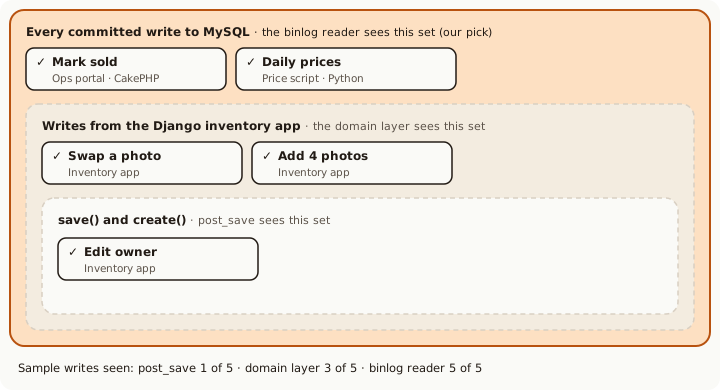
QuerySet.update() and bulk_create() send no post_save.We chose the binlog reader. Many clients write to this database. Cache logic in each of them would be easy to get wrong and would mix with business logic. Every committed write passes through the binlog, whichever client made it.
We listen to changes on these three tables and rebuild the cached JSON for the affected car_id.
Reading the binlog #
The MySQL binlog1 records every change to the database, both DDL (Data Definition Language) and DML (Data Manipulation Language).
# Data Definition Language

- CREATE | ALTER | DROP TABLE

# Data Manipulation Language

- INSERT | UPDATE | DELETE | REPLACE FROM TABLE
Using the mysql-data-stream-kafka Python library, a program reads the MySQL binlog and sends each inserted or updated row to Kafka. A Kafka topic works like a log.
What Is a Log? A log is perhaps the simplest possible storage abstraction. It is an append-only, totally-ordered sequence of records ordered by time. - Jay Kreps, Linkedin
The library uses the table name as the topic and sends one JSON message per changed row:
{"schema": "carsdb", "table": "cars", "type": "UpdateRowsEvent",
  "row": {"before_values": {"id": 2323, "price": 525000, ...},
          "after_values":  {"id": 2323, "price": 510000, ...}}}
An insert (WriteRowsEvent) has row.values instead. A consumer reads the topics that affect the car page and rebuilds or invalidates the cached JSON.
One price change, end to end #
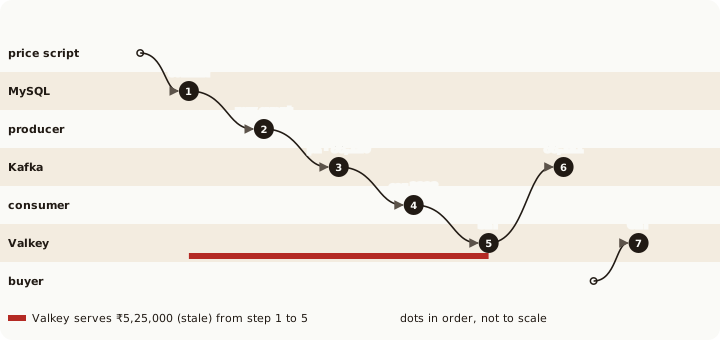
A price script lowers car 2323 from ₹5,25,000 to ₹5,10,000. These are the steps until a buyer sees the new price.
When a part fails #
We added four components to the existing MySQL database. With MySQL, five parts can fail:
- Consumer node - reads changes from Kafka and updates the cache
- Producer node - reads the MySQL binlog and pushes changes to Kafka
- Valkey server - keeps the cache in memory
- Kafka cluster - stores the database change log
- MySQL database - existing component
Each of them can fail on its own, and so can the network between them.
- The network is reliable; - Wiki
acks=1 and acks='all'.1. Consumer node fails #
The consumer commits the Kafka offset only after it has rebuilt or invalidated the cache, so processing is at-least-once. After a restart it continues from the last committed offset and may rebuild a few cars twice, with the same result. Kafka keeps messages for 7 days by default (log.retention.hours=168). An outage longer than that needs a full rebuild.
2. Producer node fails #
If the producer cannot push to Kafka, it must not lose its place in the binlog. We store the binlog position with each message we send to Kafka. After a failure we resume from the last position Kafka has. A few events can be sent twice, and the consumer handles that. The public library is simpler: it saves the position to a local file when it stops on a signal or an error.
3. Valkey server fails #
Use a managed service such as AWS ElastiCache, or run Valkey with a replica and automatic failover. If the consumer cannot write to Valkey, it does not commit the offset, and it processes the waiting messages when Valkey is back. Replication to the replica is asynchronous, so a failover can lose the last few writes. The 12-hour TTL limits how long such a key stays stale.
For 10,000 active cars with a 20 KB payload each, the cache needs about 200 MB before compression.
To keep memory bounded, set maxmemory-policy to volatile-lru and give every key a TTL. Valkey then evicts the least recently used keys that have a TTL.
4. Kafka broker fails #
Run at least 3 brokers, with a topic replication factor of 3 and min.insync.replicas=2, and set acks='all' on the producer. Then one broker can fail without losing a change. kafka-python defaults to acks=1: the leader confirms before any follower has the message, so a leader crash at that moment can drop it. More replicas cost more disk and network bandwidth.
5. MySQL fails #
The binlog is on disk, so a restart or a dropped connection loses nothing while the binlog files are kept. The producer resumes from its last position.
During a long producer outage, the binlog grows. Keep enough disk and retention (binlog_expire_logs_seconds, 30 days by default in MySQL 8.0) to cover it, and set alarms on disk use.
If the binlog is lost anyway, a Django management command rebuilds the cache for all active cars.
What this post showed #
- The car page for anonymous buyers is one gzipped JSON under
dp:{car_id}in Valkey. - Model signals and a domain layer see only writes that go through Django. The binlog sees every committed write, including the CakePHP portal and the price scripts.
- Until the consumer writes the new JSON, buyers see the old price.
- Most failures delay a change instead of losing it. A Kafka leader crash with
acks=1and a Valkey failover can still lose one; the 12-hour TTL limits how long it stays stale.
Part 2 covers the listing page: pagination and per-buyer ordering with Redis sorted sets, lists, and other data structures.
Thank you Vaibhav for reading drafts and suggestions.
-
MySQL tracks changes in the binary log; PostgreSQL uses Write-Ahead Logging (WAL).
The MySQL binary log records “events” that describe database changes, such as table creation or changes to table data. It also logs statements that could change data even when no rows changed, for example a DELETE that matched no rows. It also records how long each data-changing statement took.
WAL logs changes to data files (tables and indexes) before it applies them. So data pages need not be flushed to disk on every commit. After a crash, the database replays the WAL records to recover, which is called roll-forward recovery or REDO.
Both databases let other programs read these changes. This is Change Data Capture (CDC): tracking every change in a data source so it can be sent to other systems. ↩︎